





G Pen Dash 2 Review
The G Pen Dash 2 (G Pen also calls it the Dash II) is the budget dry herb vaporizer in G Pen’s lineup. The first thing to know is that it fixes the biggest limitation of the original Dash. Instead of three preset heat levels, you get precise temperature control with an OLED screen. It also has a bigger 0.4g ceramic chamber, a 1,100mAh battery and USB-C pass-through charging, all in a body that fits in your pocket.
The downside is what you’d expect from a device this small. It uses conduction-only heating, draws get warmer at higher temps, G Pen rates the battery for about 2 to 4 sessions per charge, and it’s dry herb only. If you’re new to vaporizers or want a simple pocket vape with real temperature control, the G Pen Dash 2 makes a lot of sense. If you need more battery or cooler draws, look at the Dash+ instead.
What Changed From the Original G Pen Dash
The Dash 2 is G Pen’s follow-up to their best-selling Dash, and the upgrades cover the whole device.
- Temperature control: The original Dash used three fixed heat levels shown by coloured LED lights. The Dash 2 has precise, adjustable temperature control.
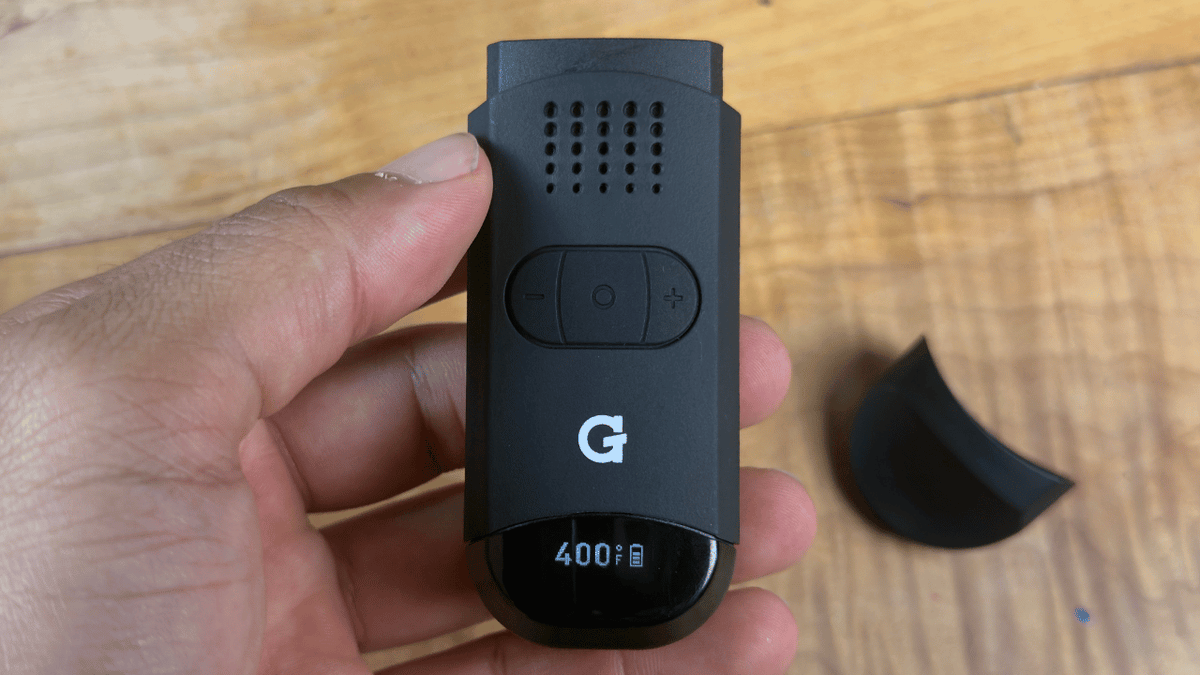
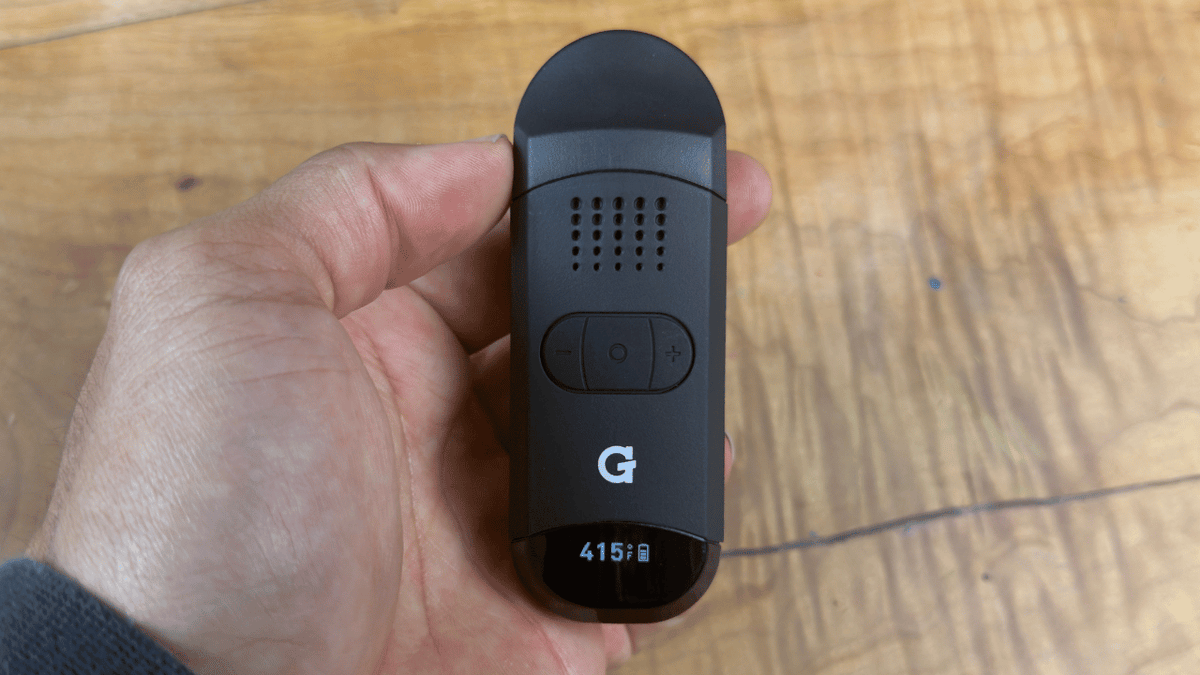
- Display: An OLED screen shows your set temperature and battery level at the same time.
- Chamber: The 0.4g ceramic chamber is bigger than the original’s, which makes it easier to load and clean.
- Battery: It’s up from 950mAh to 1,100mAh.
- Controls: Plus and minus buttons replace the original’s multi-click sequences.
One thing to keep in mind: the button sequences are different from the original Dash, so follow the Dash 2 instructions below rather than anything you learned on the old model.

G Pen Dash 2 Vaporizer
G Pen Dash 2 Vaporizer
- Regular price
-
$69.95 CAD - Regular price
-
$89.99 CAD - Sale price
-
$69.95 CAD
Temperature
Temperature control is the biggest upgrade here. With only three presets, the original Dash made you jump between widely spaced heat levels. The Dash 2 lets you adjust the heat in small steps with the plus and minus buttons, and the OLED screen shows exactly where you’re set. That means you can back off if the vapour starts feeling too warm or the flavour starts to fade.
- Lower settings: Best flavour and the coolest, gentlest draws, but the lightest vapour.
- Middle settings: The best balance of flavour and vapour, and the most versatile range for everyday sessions.
- Higher settings: The densest vapour, but warmer draws and a more roasted taste.
If you’re new to dry herb vaporizers, start in the middle of the range and work your way down once you get a feel for how it heats.
Vapour Performance
The Dash 2 uses conduction heating, which means your herb heats up by touching the walls of the ceramic chamber. That’s standard for small budget vaporizers, and it gives the best results at low to mid temperatures.
Flavour
The lower settings hold on to the most flavour. As you turn it up you get more vapour, but the taste shifts toward roasted. The ceramic chamber is a clean heating surface, so it doesn’t add a metallic aftertaste. How fresh your herb is, how much moisture it has, how clean the chamber is and how tightly you pack it all affect flavour too.
Clouds
This is a pocket vaporizer, not a cloud machine. Vapour gets noticeably thicker at the higher settings, but the small body doesn’t have much room to cool it down, so draws get warmer up there. For most people, the middle settings give the best mix of vapour and comfort.
Airflow
Airflow depends a lot on how you pack it. Overpacking the 0.4g chamber makes the draw much tighter. A light to medium pack with a medium grind gives you the best airflow and the most even heating. Keep the mouthpiece screen clean too, since residue buildup is the main reason draws get restricted over time.

How to Use the G Pen Dash 2
- Charge it fully with a USB-C cable before your first session. G Pen doesn’t include one, so you’ll need your own.
- Pull off the mouthpiece and load the chamber with ground herb. Don’t overpack it.
- Put the mouthpiece back on securely.
- Hold the main button for about 3 seconds to turn it on.
- Use the plus and minus buttons to pick your temperature.
- Press the main button twice to start heating.
- Wait about 30 seconds for it to reach temperature.
- Take slow, steady draws for the smoothest vapour.
- Press the main button twice to end a session early.
To get into the settings menu, press the main button five times.
Build Quality and What’s in the Box
The Dash 2 has a lightweight exterior and an ABS plastic mouthpiece. The plastic build keeps the weight down, but it doesn’t have the premium feel of an all-metal body. For a budget pocket vape that’s a fair trade, since a heavier build would take away from what makes it so portable.
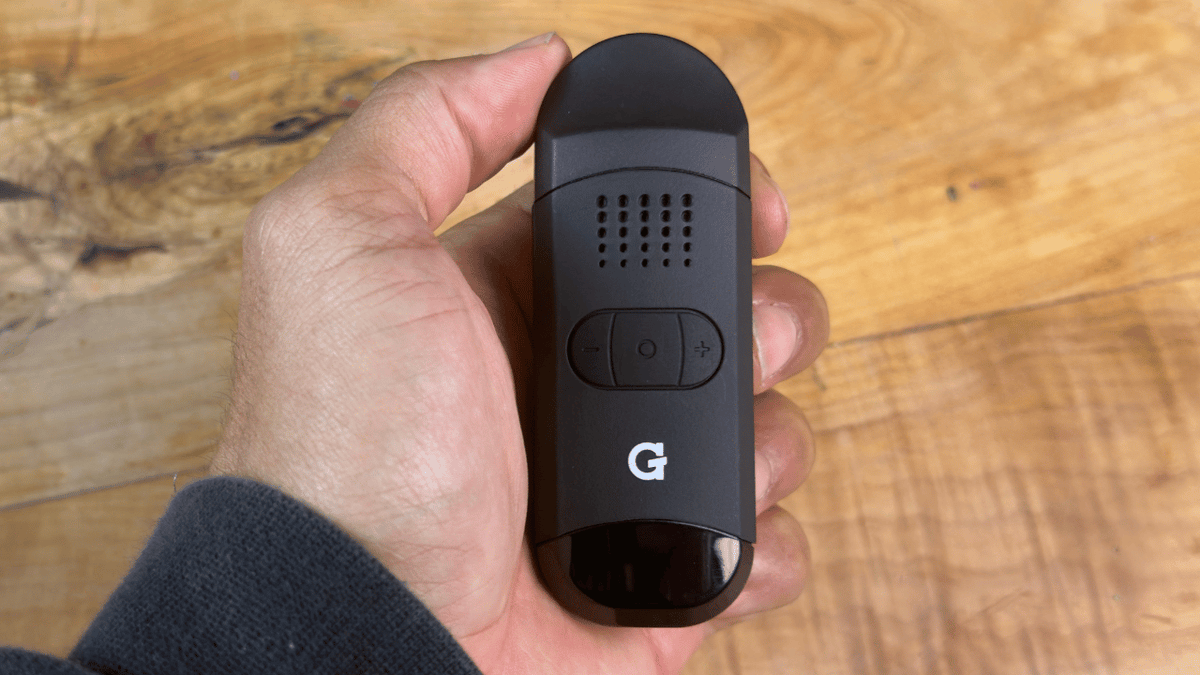
The controls are simple: a main power button with a plus and minus button on either side, and the OLED screen just below them. You can check your temperature at a glance without memorizing button combos.
G Pen covers the Dash 2 with a 6-month warranty, which goes up to 12 months if you register it on their website, so it’s worth registering right away.
-
 G Pen Elite 2G Pen Elite 2
- Regular price
-
$209.99 CAD - Regular price
-
$239.99 CAD - Sale price
-
$209.99 CAD
-
 G Pen Dash PlusG Pen Dash Plus
- Regular price
-
$159.99 CAD - Regular price
-
$219.99 CAD - Sale price
-
$159.99 CAD
-
 G Pen Micro 2 VaporizerG Pen Micro 2 Vaporizer
- Regular price
-
$89.99 CAD - Regular price
-
$109.99 CAD - Sale price
-
$89.99 CAD
-
 G Pen Micro Plus VaporizerG Pen Micro Plus Vaporizer
- Regular price
-
$74.95 CAD - Regular price
-
$89.99 CAD - Sale price
-
$74.95 CAD
-
 G Pen Dash 2 VaporizerG Pen Dash 2 Vaporizer
- Regular price
-
$69.95 CAD - Regular price
-
$89.99 CAD - Sale price
-
$69.95 CAD
-
 G Pen Hyer Quartz Tank For ConcentratesG Pen Hyer Quartz Tank For Concentrates
- Regular price
-
$54.99 CAD - Regular price
-
- Sale price
-
$54.99 CAD
-
 G Pen Hydout 510 Cartridge BatteryG Pen Hydout 510 Cartridge Battery
- Regular price
-
$39.99 CAD - Regular price
-
$49.99 CAD - Sale price
-
$39.99 CAD
-
 G Pen Melt Hot KnifeG Pen Melt Hot Knife
- Regular price
-
$39.99 CAD - Regular price
-
$49.99 CAD - Sale price
-
$39.99 CAD
-
 G Pen Micro Plus TankG Pen Micro Plus Tank
- Regular price
-
$19.99 CAD - Regular price
-
- Sale price
-
$19.99 CAD
What’s in the Box
- G Pen Dash 2 vaporizer
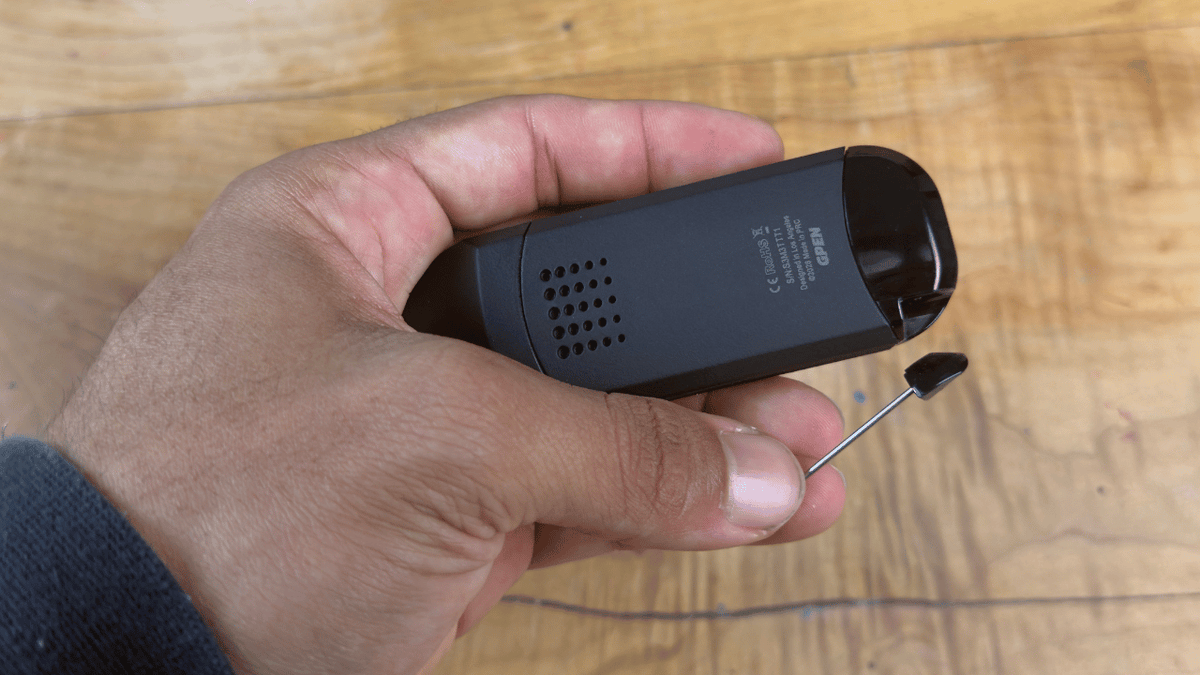
- Built-in loading tool
- Silicone mouthpiece sleeve
A USB-C charging cable isn’t included. The silicone sleeve is for when the mouthpiece warms up during longer draws.
Size and Everyday Use
At about 97 × 35 × 21mm and 62g, the Dash 2 is a true pocket vape. It’s lighter than most mid-range portables, so it’s easy to bring with you.
It’s built for people who take a few sessions a day on the go rather than vaping all day long. If you average 2 to 4 sessions a day and want something you can throw in your pocket, it fits that well. The 30-second heat-up helps for quick sessions too.
Battery and Charging Performance
The battery is 1,100mAh, up from 950mAh on the original Dash. G Pen rates it for about 2 to 4 sessions per charge, but how many you actually get depends on:
- the temperature you use (higher heat drains it faster)
- how long your sessions are and how often you go back to back
- the battery’s age and the temperature around you
- whether you started on a full charge
It charges with USB-C and supports pass-through charging, so you can keep vaping while it’s plugged in. That’s handy at your desk, or when you’re travelling and the battery gets low.
Getting More Sessions Per Charge
- Stick to the middle settings for the best balance of performance and battery life.
- Only start a heat cycle when you’re ready to draw.
- Let it cool down between back-to-back sessions.
- Charge it before you head out for the day.
The battery isn’t removable. If you need 5 or more sessions per charge without a plug nearby, the Dash+ and its 1,800mAh battery is the better pick.
Daily Use and Cleaning
The removable mouthpiece gives you direct access to the chamber, and the built-in pick tool handles both loading and scraping out residue. The bigger chamber also makes routine cleaning easier than on the original Dash.
- Let it cool completely first. Never clean it while it’s hot.
- Tap out the spent herb after every session.
- Brush out any residue with the built-in pick tool or a small brush.
- Wipe the mouthpiece screen so buildup doesn’t restrict your airflow.
- For a deeper clean, use isopropyl alcohol on the removable mouthpiece parts, and let everything dry fully before putting it back together.
- Never put the main body in water or alcohol.
Cleaning the chamber and mouthpiece screen regularly is the easiest way to keep it performing well over time.
Smell and Stealth
The Dash 2’s small, low-profile body is easy to keep out of sight. It’s a good fit if you want a discreet device that keeps odour to a minimum.
G Pen Dash 2 vs G Pen Dash+
oth have precise temperature control and USB-C charging, but almost everything else is different. The biggest difference is heating. The Dash 2 is conduction only, while the G Pen Dash+ uses hybrid heating, combining conduction with heated air moving through your herb. Hybrid heating can heat your herb more evenly, and the Dash+ also has a more elaborate mouthpiece cooling design. That matters if you like cooler draws at higher temps.
The Dash+ also has:
- a titanium chamber (also 0.4g) instead of ceramic
- a 1,800mAh battery, about 64% more capacity than the Dash 2
- a faster heat-up, around 20 seconds instead of 30
- a full-colour display instead of OLED
The trade-off is size. The Dash+ measures about 110 × 40 × 20mm, so the Dash 2 is the smaller, lighter option.
Go with the Dash 2 if you want a budget pocket vape with simple controls. If you want hybrid heating, a lot more battery, a faster heat-up and cooler draws, I’d spend more on the Dash+.
G Pen Dash 2 vs PAX Mini 2
If you’re deciding between the Dash 2 and the PAX Mini 2, it comes down to how much control you want. The Dash 2 gives you precise, adjustable temperature control with the exact setting on its OLED screen. The PAX Mini 2 keeps things simpler with four selectable heat modes. Pick the Dash 2 if you like dialling in your sessions, and the PAX Mini 2 if you’d rather choose from a few presets and go.
Final Verdict: Should You Buy the G Pen Dash 2?
For a budget vaporizer, the Dash II packs in a lot: precise temperature control, an OLED screen, a 0.4g ceramic chamber, USB-C pass-through charging and a 30-second heat-up. Its limits are what you’d expect from something this small. It has conduction-only heating, a compact body that can’t cool vapour much, a battery you can’t swap, and it’s dry herb only. None of that is a surprise for a device built for portability over power.
The Dash 2 is a great fit if you:
- want a pocket-sized dry herb vape with real temperature control
- are new to vaporizers and want a clear screen and simple controls
- are shopping on a budget
- take a few sessions a day, mostly on the go
- are upgrading from a device with only a few fixed presets
- want something discreet with minimal odour
Look at something else if you:
- vape concentrates, wax or oil (check out our dab pens instead)
- need 5 or more sessions per charge, or want hybrid heating (go with the Dash+)
- want big clouds, since the small body limits cooling
- want a removable battery or as much customization as possible
If you want to compare more options, check out our Best Dry Herb Vaporizers guide, or browse the full lineup in our G Pen vaporizers and accessories collection. Ready to buy? Shop the G Pen Dash 2 here.
Pros
- Precise, adjustable temperature control
- OLED screen shows temperature and battery at a glance
- Bigger 0.4g ceramic chamber is easier to load and clean
- Quick heat-up of about 30 seconds
- USB-C with pass-through charging
- Small and light at about 62g
- Simple button layout
Cons
- Conduction heating only
- Draws get warm at higher temps
- About 2 to 4 sessions per charge (G Pen’s estimate)
- Battery isn’t removable
- Dry herb only
- 6-month warranty unless you register it
- No charging cable in the box


