







How to Connect Your Puffco to the App (iPhone & Android)
Whether you're running a Puffco New Peak, Puffco Peak Pro 3DXL, Puffco New Proxy or Puffco Proxy Core Kit, pairing your device to the Puffco Connect app unlocks the features that make these vaporizers worth the upgrade: custom heat profiles, personalized mood lighting, and session tracking you can't get running the device on its own. This guide walks you through connecting on both iPhone and Android, plus how to fix the most common pairing issues.
Preparing Your Device for Connection
Before you start, make sure of two things:
- Bluetooth is enabled on your phone.
- Your phone's operating system is up to date. An outdated iOS or Android version is one of the most common reasons the app fails to detect a device.
Downloading the App: iPhone vs. Android
This is the part that trips most people up, because iPhone and Android use two different download paths.
On iPhone (iOS):
- Go to the App Store and download Path Browser, Puffco's recommended browser app for the best pairing experience on iOS.
- Open Path Browser and go to www.puffco.app.
- Select "Get Started" and follow the prompts.
You may notice the app is accessed through Path Browser rather than downloaded as a standalone "Puffco" app. That's expected on iOS, not an error. It's simply how Puffco delivers the Connect experience to iPhone users.
On Android:
- Go to the Google Play Store and search for Puffco Connect, or use the direct download link from Puffco's site.
- Tap Install, then open the app once it finishes downloading.
- Grant the app's requested permissions when prompted, Bluetooth and location access are both required for the app to scan for and detect your device (this is a standard Android Bluetooth requirement, not specific to Puffco).
Unlike iOS, Android doesn't require a separate browser app. The Puffco Connect app installs and runs on its own.
Pairing Your Device
Once the app is open (on either platform), the pairing steps are the same:
- Put your device into pairing mode. Hold the power button until the light bar glows blue. This tells your device to start broadcasting over Bluetooth.
- Open the app and select your device from the list. If you own more than one Puffco device, make sure you pick the right one; the app will label each by device type (Peak, Peak Pro 3DXL, Pivot, Proxy, etc.).
- Confirm the connection. Once paired, the app will sync and unlock the full feature set for your specific device.
Connecting Your Puffco Peak
The original Peak pairs the same way as above. Once connected, you'll be able to set your preferred temperature and track session history straight from the app, useful if you're still deciding between presets versus manual control.
Connecting Your Puffco Peak Pro / Peak Pro 3DXL
The Peak Pro 3DXL has the most robust app integration in the lineup. After pairing, you'll get access to:
- Custom heat profiles: save your own temperature, duration, and vapor settings per session
- Custom mood lighting: sync colors and animations, including uploading an image to pull a custom palette
- Account metrics: track number of dabs, average duration, and most-used temperatures over time
If your Peak Pro 3DXL won't connect, double-check it's fully charged first. A low battery can prevent the Bluetooth radio from broadcasting reliably.
Connecting Your Puffco New Proxy / Proxy Core Kit
The Proxy and Proxy Core Kit use the same pairing flow: power-button hold to enter pairing mode, then select the device from the app's list. Because the Proxy Core is a smaller, battery-swappable unit, make sure the core itself (not just the pipe attachment) is powered before attempting to pair.
Troubleshooting Common Connection Issues
Device doesn't appear in the app's Bluetooth list:
- Confirm the device is actually in pairing mode (light bar should be glowing blue, not just on)
- Turn your phone's Bluetooth off and back on
- Move closer to the device and try again
"Puffco won't connect to app" even after pairing mode:
- Force-close and reopen the app
- Restart your phone. This clears any stuck Bluetooth cache
- Make sure you're not already connected to the device from a different phone or tablet
iPhone users specifically:
- Confirm you're navigating to www.puffco.app from inside Path Browser, not from Safari
- Update Path Browser itself from the App Store if it hasn't been updated recently
Android users specifically:
- Make sure location permissions are enabled for the app; some Android versions require location access for Bluetooth scanning to work
- Confirm you downloaded the official Puffco Connect app and not a similarly named third-party app
Using Your Puffco Without the App
You don't strictly need the app to use your device. Every Puffco vaporizer works with its built-in preset temperatures out of the box. You'll just be limited to the factory settings rather than custom profiles, mood lighting, and session tracking. If you're only looking for a quick session and don't want to deal with pairing, this is a perfectly fine way to use the device.
-
 Puffco New Peak Pro 3DXLPuffco New Peak Pro 3DXL
- Regular price
-
$589.99 CAD - Regular price
-
$629.99 CAD - Sale price
-
$589.99 CAD
Quick view
-
 Puffco Proxy Core KitPuffco Proxy Core Kit
- Regular price
-
$339.99 CAD - Regular price
-
$359.99 CAD - Sale price
-
$339.99 CAD
Quick view
-
 Puffco Proxy Pipe KitPuffco Proxy Pipe Kit
- Regular price
-
$339.99 CAD - Regular price
-
$389.99 CAD - Sale price
-
$339.99 CAD
Quick view
-
 Puffco New PeakPuffco New Peak
- Regular price
-
$329.99 CAD - Regular price
-
$349.99 CAD - Sale price
-
$329.99 CAD
Quick view
-
 Puffco PivotPuffco Pivot
- Regular price
-
$204.99 CAD - Regular price
-
$219.99 CAD - Sale price
-
$204.99 CAD
Quick view
-
 Puffco Peak Pro LinkPuffco Peak Pro Link
- Regular price
-
$162.99 CAD - Regular price
-
$179.99 CAD - Sale price
-
$162.99 CAD
Quick view
-
 Puffco Hot KnifePuffco Hot Knife
- Regular price
-
$89.99 CAD - Regular price
-
$99.99 CAD - Sale price
-
$89.99 CAD
Quick view
-
 Puffco Proxy CorePuffco Proxy Core
- Regular price
-
$74.99 CAD - Regular price
-
- Sale price
-
$74.99 CAD
Quick view
-
 Ryan Fitt Recycler Glass Puffco MouthpieceRyan Fitt Recycler Glass Puffco Mouthpiece
- Regular price
-
$289.99 CAD - Regular price
-
$299.99 CAD - Sale price
-
$289.99 CAD
Quick view
-
 Puffco Ryan Fitt Recycler Glass 2.0Puffco Ryan Fitt Recycler Glass 2.0
- Regular price
-
$419.99 CAD - Regular price
-
$449.99 CAD - Sale price
-
$419.99 CAD
Quick view
-
 Puffco Proxy Wizard PipePuffco Proxy Wizard Pipe
- Regular price
-
$164.99 CAD - Regular price
-
$179.99 CAD - Sale price
-
$164.99 CAD
Quick view
-
 Puffco Peak Pro Glass Mouthpiece 2.0Puffco Peak Pro Glass Mouthpiece 2.0
- Regular price
-
$159.99 CAD - Regular price
-
- Sale price
-
$159.99 CAD
Quick view
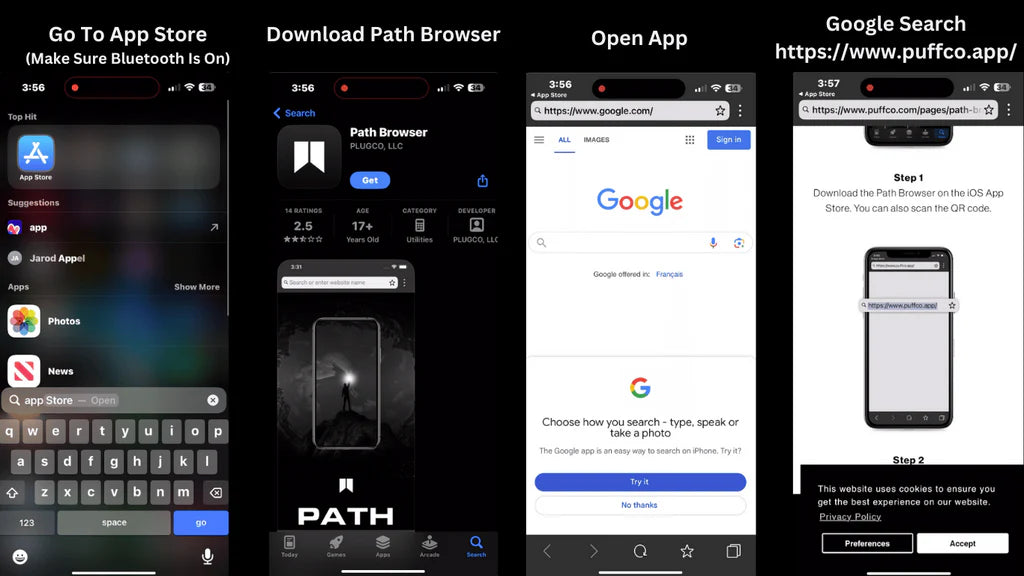
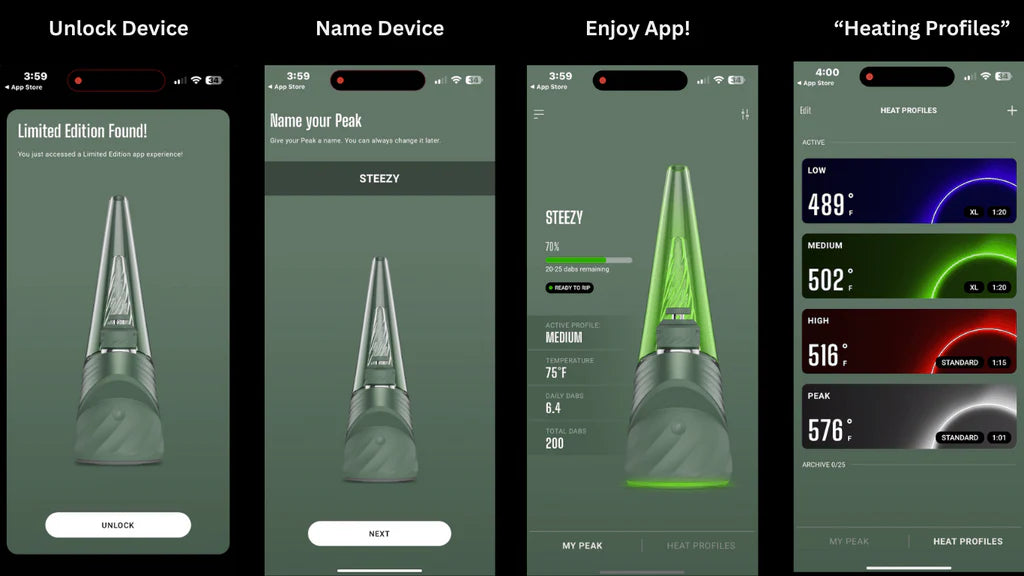
Steps 5 / 6 / 7 / 8 To Connect Your Puffco Peak Pro To IOS iPhone
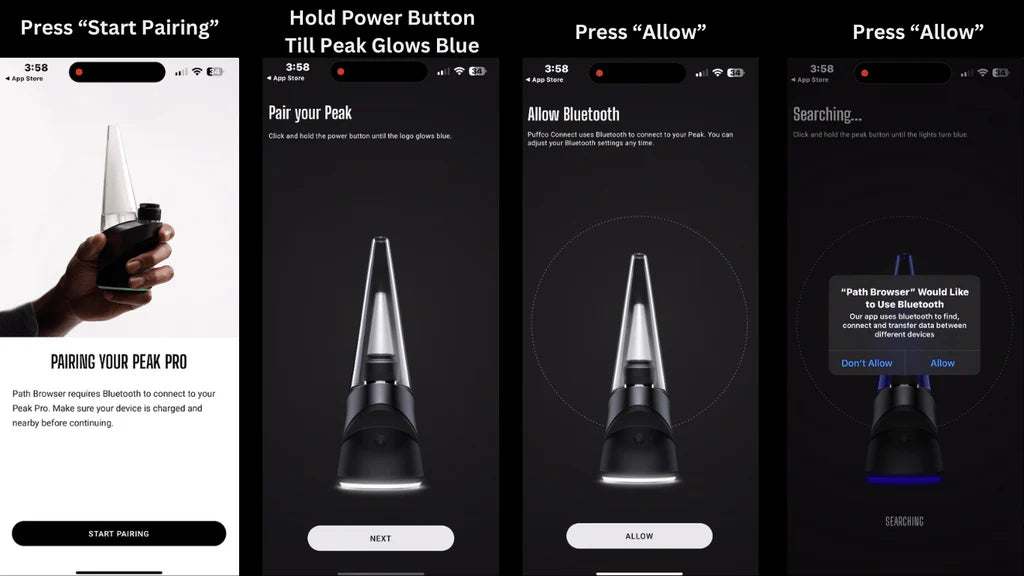
Steps 9 / 10 / 11 / 12 To Connect Your Puffco Peak Pro 3DXL To IOS iPhone
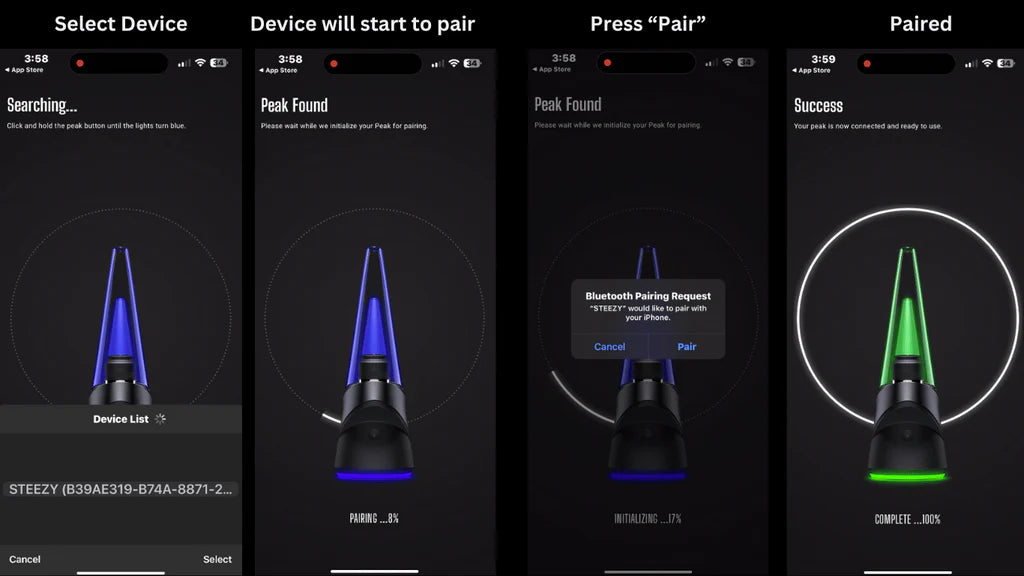
Steps 13 / 14 / 15 / 16 To Connect Your Puffco Peak Pro To IOS iPhone
Understanding the Puffco Peak Pro 3DXL
The Puffco Peak Pro 3DXL stands as a pinnacle of vaporizer technology, offering users an unparalleled experience. Its Bluetooth connectivity is not just a feature but a gateway to a customizable vaping journey. The Path Browser App on IOS allows your Puffco device to become an extension of your iPhone, offering control and insights that were previously unimaginable.
Optimizing Your Experience
Through the app, you can adjust temperature settings, session duration, and explore various features to enhance your vaping experience. It's about making the Peak Pro truly yours.
Troubleshooting Common Connection Issues
Should you face any hiccups during the connection process, the guide offers solutions to common issues like the device not appearing in Bluetooth settings or the puffco won't connect to app.


